SumTotal Next
- 0.0
- Rating
- 50.00K
- Installs
- Free
- Price

 Analysis by App-foxy
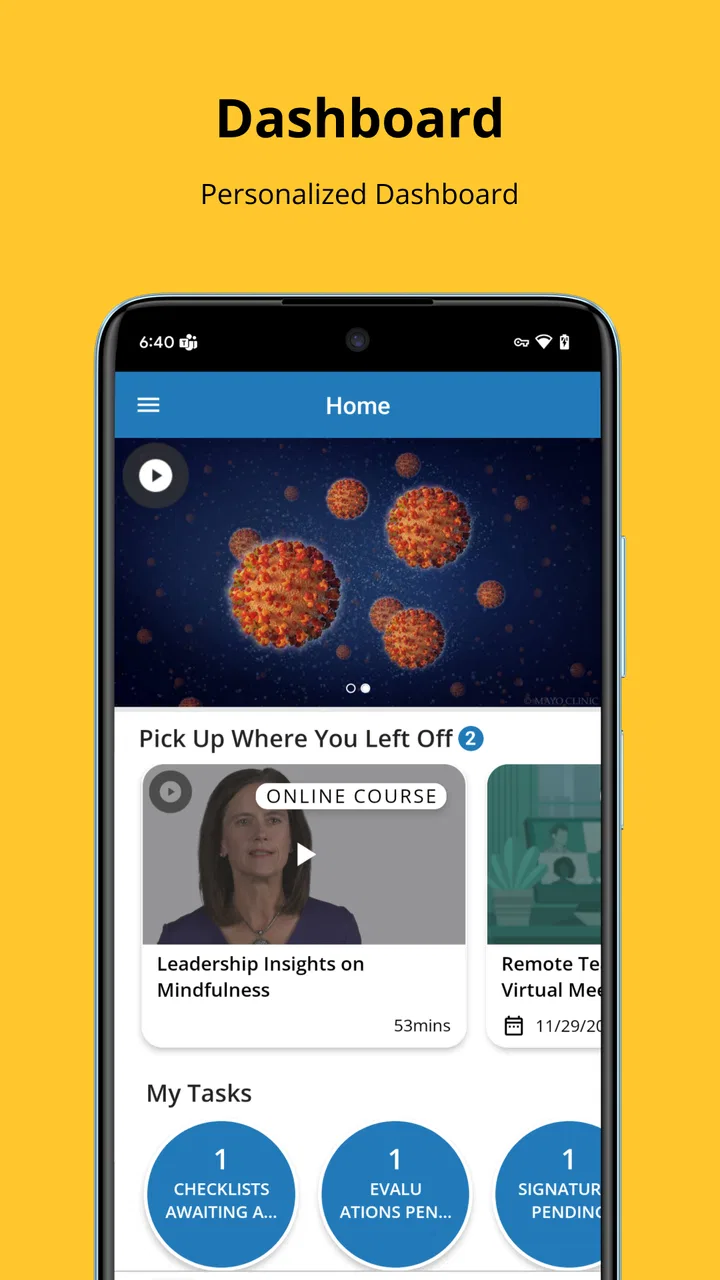
I approached SumTotal Next as a business app rather than a general productivity tool, and that distinction matters. Its purpose is to make an existing SumTotal experience easier to move through, with a more approachable interface and simpler navigation at the center of the experience. I found the app most relevant for people who already interact with SumTotal in a work setting and want less friction when reaching the areas they use regularly.
The app is free to download, which makes trying it straightforward from a personal cost perspective. It is published by SumTotal Systems LLC, carries an Everyone age rating, and is listed for Android devices running OS 12 or later. The current release is version 3.4, and the app has passed the 50K-install mark. Those details place it in the practical business-tool category: it is not presented as a consumer entertainment app, but as a work-oriented mobile entry point.
How SumTotal Next feels in everyday business use
The first thing I noticed is that the value here is not about adding excitement to work. It is about reducing the effort involved in finding and using the parts of a business system that employees already need. A complicated enterprise interface can make a simple task feel longer than it should, especially when someone is checking it between meetings or from a phone. A cleaner route through the app can make that kind of interaction feel more manageable.
You May Also Like

 Blood Strike: 2.5 Anniversary
Blood Strike’s Loadouts Turn Every Drop Into a Tactical Gamble
A close look at Blood Strike’s custom loadouts: how fast access to signature weapons reshapes its battle royale rhythm, rewards preparation, and narrows the gap between fights.

 Pandora - Music & Podcasts
Pandora’s Music Is Easy to Start, but Harder to Recover
Pandora’s strength is its low-effort path from a seed to a station. Its weak spot is how much confidence it asks you to place in connection, setup, and quiet recovery.

 8 Ball Pool
8 Ball Pool Is Built on Rivalries, Rematches, and Routine
A close look at the rivalries, rematches, shared routines, and unanswered safety questions that turn a quick pool match into a persistent mobile community.

 Samsung Music
Samsung Music’s Quiet Strength Is Playing What You Already Own
Its reach comes less from spectacle than from dependable access to a personal library. That simplicity is both the app’s strongest retention engine and its ceiling.

 AccuWeather: Weather Radar
AccuWeather Review: A Quick, Clear Forecast for Everyday Decisions
For everyday plans, the best forecast is the one you can understand quickly. AccuWeather makes rain timing, radar, and local conditions easy to act on, with a few trade-offs.

 Hill Climb Racing
Why Hill Climb Racing Still Turns Crashes Into One More Run
A tiny car, a bumpy hill and one more upgrade: Hill Climb Racing keeps resurfacing because its simple chaos makes every near-miss feel personal.
More From Our News Desk
View All News


That focus makes the app easier to understand than a broad “do everything” productivity application. I would not install it expecting a replacement for email, a document editor, a team chat platform, or a personal task manager. SumTotal Next is better viewed as a focused business companion for people whose organization already relies on the SumTotal environment.
In a realistic workday, I can imagine opening it before a meeting to reach the relevant area of the system, checking an item while away from a desk, or moving through a familiar workflow without first decoding a dense menu structure. The benefit is small in each individual interaction, but repeated business tasks are exactly where small reductions in confusion can become worthwhile.
The interface is the main reason to try it
The central promise is an intuitive interface with simplified navigation, and that is also the main lens through which I would judge the app. A redesign only helps if it shortens the path between opening the app and reaching the task that matters. For an existing SumTotal user, the improvement may be less about learning a new product and more about feeling less lost inside a known one.
There is an important trade-off here. Simplification can make common destinations easier to reach, but it may also feel less efficient to experienced users who already know the older layout by memory. Someone who has built a precise routine around a familiar interface may need a short adjustment period before the new arrangement feels natural. That is not a reason to dismiss the app, but it is a reason to judge it by daily convenience rather than by appearance alone.
I also think the simplified approach is more valuable on a smaller screen than on a large office monitor. Mobile interfaces have less room for dense menus, and unclear navigation becomes more noticeable when scrolling and tapping replace a full desktop layout. If your work with SumTotal often happens away from a desk, the design direction makes more sense than it would for someone who almost never leaves the desktop version.
Where the free price fits into the decision
SumTotal Next is free, so there is no purchase decision to weigh against a listed subscription or one-time charge for the app itself. That makes the initial decision simple: if your organization uses the relevant SumTotal system and your device meets the operating-system requirement, installing it does not require a direct app purchase.
Still, free access should not be confused with universal usefulness. The app’s value depends heavily on whether it fits the business environment you already use. A free app that does not connect to your workplace needs is not a bargain in practical terms; it is simply unnecessary. I would therefore treat the price as a low-risk invitation to test the experience, not as proof that the app will replace other business software.
This distinction is especially important for employees deciding independently. The app may be free to install, but the useful question is whether your employer’s SumTotal setup supports the way you need to work. I would check that internally before planning around it, particularly if mobile access is important for time-sensitive tasks. The free price removes a financial barrier, but it does not remove the need for organizational fit.
Small workflow choices that can make a difference
One practical tip is to evaluate the app using your three most common work destinations rather than browsing randomly. On the first day, I would note how many taps and screens it takes to reach each one, then repeat the same routes after a few uses. This gives a more useful impression than deciding based only on the opening screen. The app’s stated advantage is navigation, so navigation should be the thing you actively test.
A second useful approach is to test it during the kind of interruption-heavy day when mobile access matters most. Open it between appointments, while preparing for a meeting, or when you have only a short window to check something. A business interface can feel perfectly acceptable in a quiet trial and much more frustrating when attention is divided. That contrast will tell you whether the simplified design is genuinely helping your routine.
Third, compare the mobile route with the desktop route for the same task instead of treating them as competing products. The mobile app may be the better choice for quick checks and short interactions, while the desktop environment may remain more comfortable for longer sessions. I would not force every task onto the phone simply because the app is available. The strongest setup may be a division of labor between mobile convenience and desktop space.
Finally, give the revised navigation enough time to settle before judging it. A familiar old layout can feel faster simply because you have memorized it. If SumTotal Next reorganizes the journey, the first session may not reflect the long-term experience. I would compare repeated routes over several work sessions and pay attention to whether I am searching less, backing out less often, and reaching the intended area with fewer moments of uncertainty.
What it does well for the right audience
The clearest strength is focus. SumTotal Next is not trying to become an all-purpose office suite in the description available for it. Instead, it concentrates on making a SumTotal-related business experience easier to approach. That narrow purpose can be a strength because users do not have to sort through unrelated consumer features before reaching their work.
It also has a sensible accessibility profile for a broad workplace audience. The Everyone rating means the app is not framed around mature content, and the Android requirement is clear enough for people to check device compatibility before installing. The combination of free access and a relatively focused purpose makes it easy for a team member to try without committing money or replacing an established workflow immediately.
The developer identity is another practical point for organizations already familiar with SumTotal Systems LLC. In a business setting, people often care less about novelty than about whether an app belongs to the system they already recognize. That connection gives the app a clear reason to exist, even though it also limits its usefulness for people outside that ecosystem.
Where the trade-offs become visible
The biggest limitation is the app’s dependence on context. If you are not part of a workplace that uses SumTotal, the simplified interface has little standalone value. It is not the kind of free business app I would recommend to someone simply looking for a new notes tool, calendar, project board, or team messenger. The category label alone should not be mistaken for broad compatibility with every office workflow.
Another trade-off is that a more intuitive interface does not automatically make an underlying business process simple. If a task requires several approvals, specific organizational rules, or information maintained elsewhere, better navigation can help you reach the process without removing the process itself. I would expect the app to reduce interface friction, not to eliminate workplace complexity.
There is also a difference between finding a destination and completing meaningful work there. A redesigned path can improve the first part, while the usefulness of the second part depends on the tools and access available in the connected SumTotal environment. That is why I would test an actual routine rather than rely on the promise of easier movement through the app.
Users on older phones should pay attention to compatibility before making the app part of their routine. The minimum operating-system requirement is Android 12, so anyone below that threshold will need a different device or access method. For a company managing a mixed fleet, this can become a practical rollout consideration: the app may be a good fit for newer devices while some employees continue using another route.
Who is most likely to get real value?
I would recommend SumTotal Next first to employees who already use SumTotal and regularly need mobile access. It is especially suited to people who move between rooms, sites, meetings, or work locations and do not want every small interaction to wait until they return to a desktop. The free price makes it reasonable to test, while the navigation focus gives that test a clear purpose.
It may also suit occasional users who find enterprise software intimidating. Someone who only opens a business system now and then can forget where functions are located, making a simplified route more valuable than a highly customizable but dense interface. In that situation, consistency and clarity may matter more than advanced personalization.
Managers and team leads could also find it useful when they need a quick mobile view of routine work, provided their organization’s setup supports the necessary access. I would not assume that every role will benefit equally. A person who performs detailed, lengthy administrative work may still prefer a larger display, while someone checking a small number of recurring items may appreciate the mobile format much more.
On the other hand, I would skip it if you are searching for a general business organizer or if your workplace does not use the SumTotal platform. I would also hesitate to make it the only work tool for tasks that require extensive data entry, careful comparison across many fields, or prolonged concentration. A simpler interface is helpful, but a phone remains a phone, and screen space can become the limiting factor.
How it compares with usual business alternatives
Compared with a general productivity suite, SumTotal Next has a narrower job. Apps built around notes, calendars, messaging, or project boards usually offer broader independent functionality, while this app’s appeal comes from being connected to a specific business environment. If you need to organize personal tasks across many services, a general tool will probably be more flexible. If you need a cleaner way into SumTotal work, that flexibility may not matter as much.
Compared with using the desktop interface in a mobile browser, a dedicated app can feel more purposeful because the experience is designed around mobile navigation rather than simply shrinking a larger page. However, I would still compare both routes for your own routine. A browser may be more convenient when you need several unrelated work systems in one place, while the dedicated app may be preferable when you repeatedly return to the same SumTotal tasks.
Compared with continuing to use an older or more complex SumTotal interface, the decision comes down to whether the new route saves time after the learning period. Experienced users may value continuity, while occasional users may value clarity. My advice is to measure the change by effort: fewer wrong turns, less menu hunting, and a more comfortable experience on a phone are stronger reasons to switch than a merely different visual style.
My verdict for a free business companion
SumTotal Next is worth trying when your work already depends on SumTotal and mobile navigation has been a source of friction. The free price makes experimentation easy, and the app has a specific, understandable purpose: provide a more approachable route through a business system. I like that the value proposition is practical rather than inflated. It does not need to replace every office tool to be useful.
I would make the decision after testing real tasks, not after looking only at the opening screen. Check your normal destinations, try the app during a busy day, and compare it with the desktop or browser route you already use. If the new navigation helps you reach routine work with less hesitation, it earns a place on your phone. If your work is mostly long-form or highly detailed, keep the desktop option close.
For me, the strongest case is convenience for existing SumTotal users, not universal business productivity. The app is free, aimed at Everyone, developed by SumTotal Systems LLC, and available for Android 12 or later, but those facts are useful only when they match your workplace context. I would recommend it to the right employee without hesitation, while advising everyone else to skip it rather than install another app that does not serve a real daily need.
FAQs for SumTotal Next
01What is SumTotal Next used for?
SumTotal Next is a learning and talent management application designed to help employees access training, complete assigned courses, view learning materials, and track their professional development. Depending on how an organization has configured the platform, users may also be able to review certifications, participate in learning activities, receive notifications, and manage parts of their personal development plan from a mobile device.
02Can I use SumTotal Next without an employer or school account?
Usually, no. SumTotal Next is generally provided through an organization that uses the SumTotal learning platform, such as an employer, training provider, or educational institution. You normally need valid login details supplied by that organization, and in some cases you may also need a company-specific server address or access code. Downloading the app alone does not create an independent account or provide access to its courses.
03Does SumTotal Next work offline?
Offline availability depends on the course content and the configuration chosen by your organization. Some learning materials may be downloaded for later use, while interactive activities, assessments, progress synchronization, videos, or live sessions may require an internet connection. If offline access is supported, it is best to open the course while connected first and synchronize your progress after reconnecting.
04What devices and permissions does SumTotal Next require?
SumTotal Next is intended for compatible Android and iOS smartphones or tablets, although exact operating-system requirements can change with future updates. The app may request permissions related to internet access, notifications, storage, camera, microphone, or device features used by particular courses. You should review the permissions shown during installation and allow only those needed for the learning functions you plan to use.
05Why can’t I log in or see my assigned courses in SumTotal Next?
Login and content problems are often related to organization settings rather than the app itself. Check that you are using the correct username, password, company portal, and access code, then confirm that your account is active and connected to the correct organization. If courses are missing, they may not yet be assigned or synchronized. Contact your employer’s training administrator or IT support if the issue continues.
Pros
- Centralizes courses
- certifications
- and learning tasks in one app.
- Supports mobile learning for employees away from their desks.
- Push notifications can help users remember assigned training.
- Progress tracking makes it easier to monitor learning completion.
- Useful companion for organizations already using SumTotal Learning.]
Cons
- Most features depend on an employer’s SumTotal configuration and permissions.
- The interface may feel dated compared with newer learning platforms.
- Performance can vary with network quality and backend system load.
- Not useful as a standalone app without organizational account access.
- Some content may be difficult to navigate on smaller phone screens.

SumTotal Next
Gallery